

ChatGPT, Gemini, and DeepSeek are three of the most popular AI chat assistants in the world, and if you are a student you have probably heard friends argue about which one is best. The honest answer is that it depends on what you are doing. All three are built on large language models, which means all three predict useful text one piece at a time, and all three can sound confident while being wrong. This guide compares them in plain language so you can pick the right tool for the job instead of picking a favorite and sticking with it forever.
A quick note before we start. These products change fast. Models get renamed, features move between free and paid plans, and limits shift without much warning. Treat this as a guide to how the tools differ in character, and check each company's own pages for current details.
ChatGPT (OpenAI)
ChatGPT is the assistant that made chatbots mainstream, and it is still the one most people try first. It feels like a polished all-around helper. You can ask it to explain a concept, outline an essay, debug a few lines of code, brainstorm project ideas, or roleplay a job interview, and it usually responds in a friendly, organized way.
Strengths: a polished all-around assistant for explaining, writing, coding, and brainstorming. It has a huge community, so there are tutorials and prompt examples for almost everything. It handles back-and-forth conversation well, so you can keep refining an answer over many turns.
Watch out for: confident mistakes. It can invent facts, sources, and quotes that sound completely real. Some of the best features sit behind a paid plan, and usage limits on the free tier can interrupt a long study session.
A good use for ChatGPT is turning a messy idea into a clear plan. Paste in your rough notes and ask it to organize them into an outline, then fix the parts that are wrong yourself.
Gemini (Google)
Gemini is Google's assistant, and its biggest advantage is where it lives. It connects with tools many students already use every day, such as Google search, Docs, Drive, and Gmail, depending on your account type and settings. That makes it handy when your work already sits inside Google's world.
Strengths: strong integration with Google products, good at working with images and other kinds of input alongside text, and useful for quick research-style questions where a search connection helps.
Watch out for: it can still be wrong, even when it sounds sure. Features differ between personal accounts and school accounts, and some school administrators turn parts of it off. Always check what your school allows before relying on it for an assignment.
A good use for Gemini is summarizing a long document you already have, or asking questions about material that lives in your Google account. Just remember that a summary is a shortcut, not a replacement for reading the parts that matter.
DeepSeek
DeepSeek is a newer assistant from a company based in China, and it got a lot of attention because it performs well on reasoning, math, and coding tasks while being offered at very low cost. Many people like that it shows its step-by-step thinking, which can help you follow how it reached an answer.
Strengths: strong at math, logic, and code, often shows its reasoning steps, and is inexpensive or free to use for many tasks.
Watch out for: privacy. According to its own privacy policy, DeepSeek stores user data on servers in China. That does not make it unusable, but it does mean you should never type in personal details, passwords, or anything you would not want stored. Answers on some sensitive political topics can also be limited or one-sided, so cross-check anything important.
A good use for DeepSeek is working through a tricky math or coding problem and reading its reasoning to see where your own approach went off track. Keep the questions general and leave out anything personal.
How they compare in everyday tasks
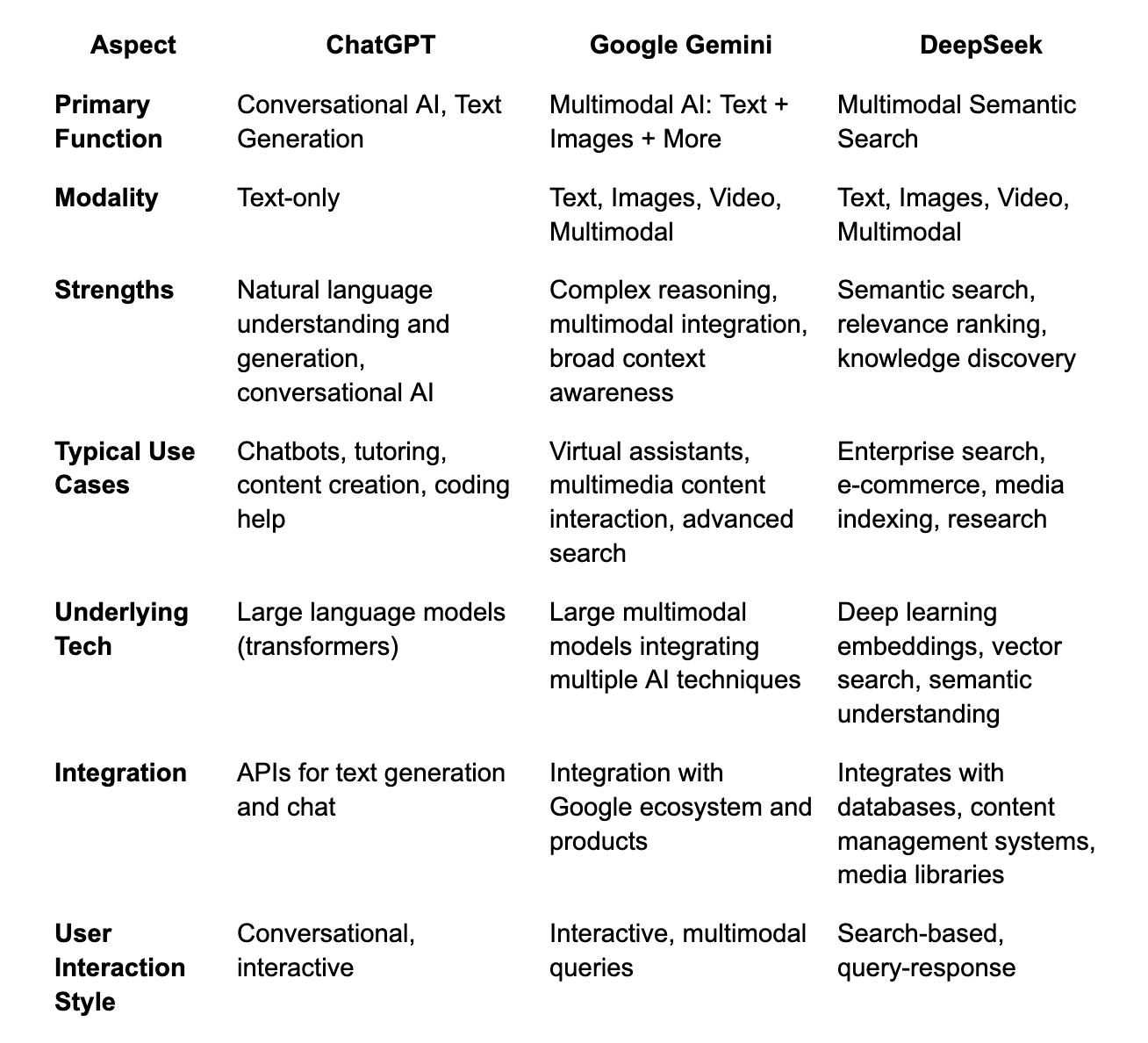
Instead of asking which tool is best, ask which tool fits the task in front of you. Here is a rough way to think about it.
Writing and brainstorming: ChatGPT is a comfortable default, and Gemini is a solid second opinion.
Working inside Google Docs or Drive: Gemini has the natural advantage.
Math, logic puzzles, and code: DeepSeek is worth trying, and the others are strong here too.
Anything involving personal information: be careful with all three, and be most careful with DeepSeek.
Keep in mind that this is a rough guide, not a rule. The same question can get a better answer from a different tool on a different day, because the models keep changing.
A word about privacy
No matter which assistant you use, treat the chat box like a public bulletin board that only you can see most of the time. Do not paste in your full name, address, school login, health details, or other people's private information. Many services may use conversations to improve their products unless you change a setting, so look at the privacy controls and turn off training where you can. If you would not say it to a stranger, do not type it to a chatbot.
When to use each
Use ChatGPT when you want a friendly, flexible helper to talk an idea through, draft something rough, or practice explaining a topic.
Use Gemini when your work already lives in Google tools or when you want to combine text with images.
Use DeepSeek when you want to see the reasoning on a math or coding problem, and keep your inputs free of personal data.
Our advice
Do not pick one assistant and trust it forever. The best habit is to ask the same important question in two or three of them and compare. When the answers agree, you have a little more reason for confidence. When they disagree, you have found exactly the place where you need to slow down, check a trustworthy source, and think for yourself. That small habit protects you from the most common AI mistake, which is believing the first confident answer you see.
Whichever tool you choose, you stay in charge. Use it to understand things faster, not to skip understanding altogether. Ask it to explain, then explain the idea back in your own words. Ask it for sources, then open them and make sure they are real. Your teachers care about what you actually learned, and so will you, long after the chatbot has been replaced by something newer.
Keep learning: read more on our blog or start the free Introduction to AI course to practice these skills step by step.
Sources: OpenAI, Google, and DeepSeek product and privacy pages.
When to use each one
Everyday learning and writing help: ChatGPT is a safe first pick.
Working with photos, documents, or Google apps: try Gemini.
Step-by-step math or coding practice: DeepSeek's reasoning models are worth testing, ideally without sharing private information.
Our advice
Do not pick one forever. Ask the same question to two tools and compare the answers. When they disagree, that is your cue to check a trusted source. The skill that matters most is not which tool you use, but how well you question what it tells you.
Ready to practice? Start the free Intro to AI course, or read our single-tool guides to ChatGPT, Gemini, and DeepSeek.
Sources: OpenAI, Google, and DeepSeek product pages and privacy policies; DeepSeek transparency page (deepseek.com).
